 Time To Class
One lesson in, one lesson off.
No invoices, no chasing.
Parents pay up front. You check students in on your iPhone and each one who turned up is charged for that lesson. Who has credit left and who needs to top up is right there in the app.
No card needed for the trial. Then NZ$30 a month + GST.
Coaching is the easy part. The record-keeping isn't.
Lessons tallied in a notebook
Cross off a box after every lesson, forget one and nothing adds up at the end of the month.
"How many lessons are left?"
Answering means scrolling back through messages and bank transfers.
Awkward top-up talks
The credit ran out weeks ago and you only remember a few lessons later.
Here's what the week looks like with Time To Class.
Every step below is a real feature in the app — this is exactly how the charging and reminders work.
-
Open the student's Credit and tap "Add Credit", then enter the amount and a note.
Time To Class never handles the money: take cash or bank transfers as usual and record what you receive.
-
Pick the course, tick Tuesday and Thursday, repeat for 8 weeks at 4 pm, and 16 lessons appear. Duplicates are skipped automatically.
Then book your regulars into the course. Someone just dropping in? Add them to that one lesson only.
-
When a lesson starts, the Lock Screen and Dynamic Island show the time left and how many students have checked in — tap to take attendance.
You can also put the "Today's lessons" widget on your Home Screen.
-
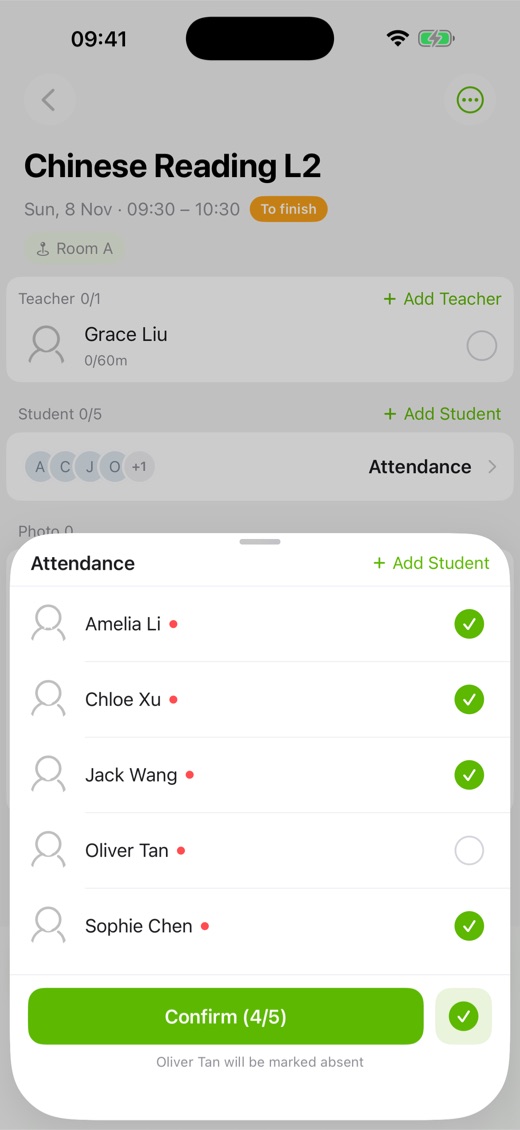
Tick each student or tap "All here", then confirm. Everyone present is charged the course price for one lesson; anyone absent or on leave isn't.
Ticked the wrong one? Change them to absent and the charge is refunded automatically.
-
A "Balance too low" bar appears at the top of attendance, showing who's short and by how much. Got paid on the spot? "Add balance". Not yet? "Remind to top up" emails the parent their balance.
You can still finish the lesson. The balance goes negative and shows in red, and the next top-up covers it first.
-
Each student's balance and every top-up, lesson charge and absence refund are in their details. Send a screenshot and you're done.
Student details › Credit › Add Credit
Screenshots show a sample school; screens marked "Illustration" are drawn to match the app. In coach mode, courses and lessons are set up in the iPhone app; on the web, the Agenda lets you view each day's lessons, take attendance and finish lessons.
From download to your first lesson in ten minutes.
Coach mode needs no terms, no rooms and no teacher setup.
Create your school
Sign up, name your school and choose "Prepay & deduct". Your 30-day trial starts straight away.
Add a course
Name, price per lesson, usual time and length. Different prices for private and group lessons? Make two courses.
Add students
Include a parent's email so top-up reminders can be sent.
Record prepayments
When you're paid, add it to the student's credit.
Schedule
Batch Scheduling sets up weeks of lessons at once.
Book students and teach
Book students into lessons; checking them in charges them automatically.
What coaches ask
Private and group lessons cost different amounts?
Create two courses with their own prices. Each check-in charges the price of the course that lesson belongs to.
Can parents pay online?
No — Time To Class never handles the money. Take cash or bank transfers as usual and record each payment in the student's credit; for a refund, record a negative amount with a note.
Do parents need the app?
No. Top-up reminders go to parents by email (the student needs an email on file, and each student gets at most one reminder per 24 hours).
Is it phone-only?
Courses and scheduling are done in the iPhone app. On a computer, the web Agenda shows each day's lessons and lets you take attendance, finish lessons and add a student to a lesson.
What about missed lessons?
Absent or on-leave students aren't charged, so nobody "owes" a make-up. If they want one, just schedule another lesson — they're charged when they turn up.
What if I grow and want to invoice by term?
The way you run your school is set when you create it. To switch, email [email protected] and we'll move you over. See how tutoring schools use it.
How much is it?
NZ$30 per school per month + GST, with every feature included. The first 30 days are free and need no card; if you don't subscribe afterwards, your data stays and the school becomes read-only.
Let the app keep count from your next lesson.
Set up your school today — the first 30 days are free.