 Time To Class
Schedule by term.
Invoice what was taught.
Set up the term's lessons, invoice every family in one go and send it out. Take attendance in the app as you teach — leave and make-ups are tracked for you, and unpaid invoices are one tap to chase.
No card needed for the trial. Then NZ$30 a month + GST.
Lesson planning is busy enough without doing fees by hand.
Working out every family's fees
How many lessons, which week is a holiday, who gets a discount, who paid extra last term — all in a spreadsheet.
Leave and make-ups from memory
Who's owed a lesson and whether it's been made up — and at the end of term it doesn't add up.
Chasing payments
Matching the bank statement, then messaging families one by one.
Here's what a term looks like with Time To Class.
Every step below is a real feature. Invoicing and reminders are easiest on the web; attendance is done in the iPhone app.
-
Enter the term dates and each course lays out its weekly lessons, skipping public-holiday weeks by default. "Import" brings last term's courses over one at a time — times, prices, rooms and regular students come with them.
GST, the payment details on your invoices (your bank account) and the discount from the second lesson in a week are set once in school settings.
-
Students with "Unbilled lessons" get a "Create Invoice": lessons, discounts, credit carried over from last term and GST are all worked out.
Select the invoices and send — each family gets a PDF invoice by email, in English or Chinese to match the family.
-
Open today's lesson, tap "All here" or tick each student, mark anyone on leave, confirm and finish the lesson. Students who were absent or on leave are recorded as missing a lesson.
-
On the lesson they'll attend, add the student with the type "Make-up". Make-ups aren't invoiced, and if they miss the make-up too, they get the chance back.
-
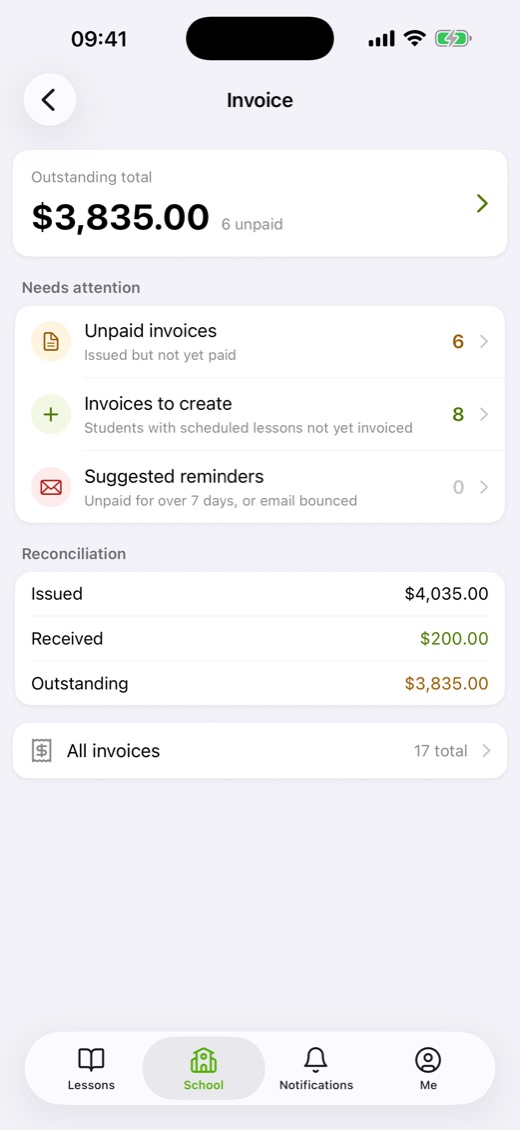
"Suggested reminders" lists invoices unpaid more than 7 days after sending; send reminders in one go (check your bank statement first).
When money arrives, mark it paid; the totals below show issued, received and outstanding.
-
Lessons already invoiced are never counted twice; anything new is counted as not yet invoiced, ready for another invoice.
-
Check each student's payments, attendance and remaining make-ups. Carry unfinished make-ups into next term, or turn them into credit off the next invoice. Import the courses into the new term and invoice again.
Create the term, then import courses from last term
Screenshots show a sample school; screens marked "Illustration" are drawn to match the app. The web version has every feature the app has — invoicing, emails and settings are easier on a computer.
Up and running in an afternoon.
Go in this order — each step uses the one before it.
Create your school
Sign up, name your school and choose "Terms + invoices". Your 30-day trial starts straight away.
School settings
GST, payment details and multi-lesson discounts. They only affect invoices made afterwards, so set them first.
Create a term
Enter the start and end dates; holiday weeks are skipped.
Rooms and teachers
Teaching on your own? Add one room (say "Home" or "Online") and add yourself as the teacher.
Courses
Day, time, room and price per lesson — or import last term's.
Students
Add a parent's email and language, enrol them in courses, and you're ready to invoice.
What tutors ask
Do parents need the app?
No. Invoices and reminders arrive by email as a PDF that opens in any browser. The app is for you and your teachers.
A family paid only part of an invoice?
Wait until it's paid in full before marking it paid, or mark it paid with the amount actually received — the invoice list shows what was received so it's easy to reconcile later.
Does it handle GST?
Yes. Turn on GST in school settings and invoices show it; prices can be GST-inclusive or exclusive.
A student joins mid-term?
Enrol them in the course for the lessons that are still to come (the app books all unfinished lessons by default), then create an invoice for them from "Unbilled lessons".
Other teachers teach with me?
Send them an invite code. They log in with their own account and take attendance for their own lessons; school settings, subscription and payroll are for admins only.
No iPhone?
No problem. The web version has every feature, and attendance can be taken in the web Agenda too.
How much is it?
NZ$30 per school per month + GST, with every feature included. The first 30 days are free and need no card; if you don't subscribe afterwards, your data stays and the school becomes read-only.
Teaching one-to-one and charging per lesson? See how coaches use it: parents prepay and each lesson is deducted.
Let the system work out this term's fees.
Set up your school today — the first 30 days are free.